


Chapter 1 · GAD language
Your first GAD program
Create a GAD file in WASDEV, run it, check it and format it. Every command on this page was run in the WASDEV terminal.
Write the program
- Open a project folder in WASDEV.
- In the explorer, create a file named
bilten.gad. - Type the program below. WASDEV colours the keywords and proposes them while you type.
- Press
Ctrl+Sto save.
# bilten.gad — kalkile mwayèn yon klas

fè mwayèn ak nòt-yo
    echèk "Pa gen okenn nòt pou kalkile." si nòt-yo vid
    retounen sonm(nòt-yo) / longè nòt-yo
fini

fè apresyasyon ak m
    retounen "Ekselan" si m pa mwens pase 90
    retounen "Trè byen" si m pa mwens pase 75
    retounen "Byen" si m pa mwens pase 60
    retounen "Dwe travay plis"
fini

elèv-yo = [
    { non: "Jira", nòt: [90, 85, 95] },
    { non: "Bosou", nòt: [60, 72, 68] },
    { non: "Ayida", nòt: [45, 55, 50] }
]

montre "BILTEN KLAS LA"
pou chak e nan elèv-yo
    m = mwayèn(e.nòt)
    montre "{e.non} : {won(m)} — {apresyasyon(m)}"
fini
montre "Kantite elèv : {longè elèv-yo}"- A line that starts with
#is a comment. - A block closes with
fini. Indentation is free. - Text between
{and}inside a string is replaced by its value.
Run it
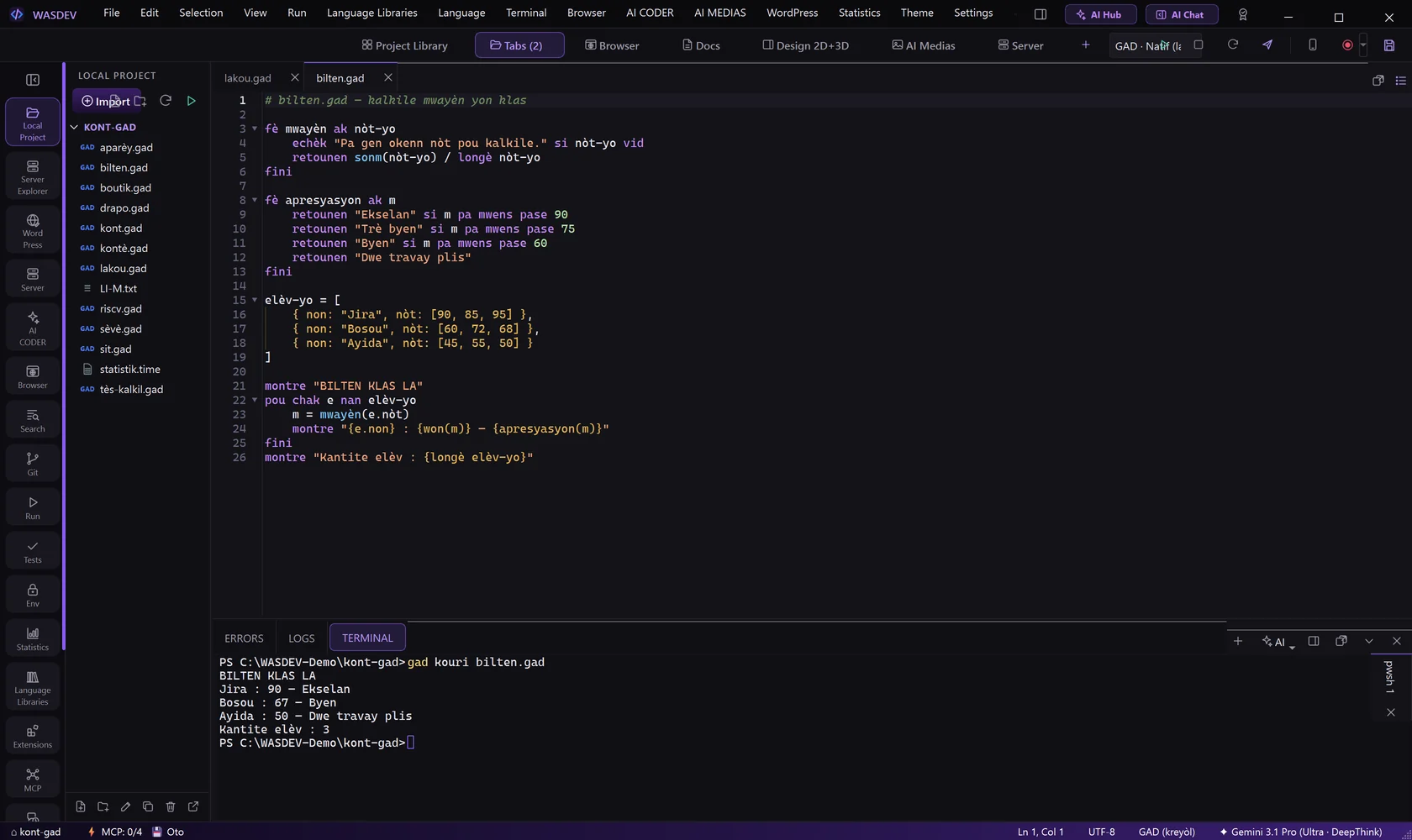
- Keep the file open in the editor.
- Press
F5. WASDEV runs the file with the GAD compiler and shows the result in the terminal. - Or type the command yourself in the terminal:
gad kouri bilten.gad.
BILTEN KLAS LA
Jira : 90 — Ekselan
Bosou : 67 — Byen
Ayida : 50 — Dwe travay plis
Kantite elèv : 3
Check and format
- Open the Run menu and choose GAD: Check syntax. The compiler reads the file without running it.
- Choose GAD: Format to put the code in the official GAD style.
bilten.gad : sentaks la kòrèk (6 deklarasyon, 1 fichye).- Typed in the terminal:
gad tcheke bilten.gadandgad fòmate bilten.gad. gad fòmate bilten.gad --wèshows the formatted code without writing the file.
Read GAD in English
gad tradui shows a file with English keywords, for reading only. The language of the project stays Creole.
def mwayèn with nòt-yo
    fail "Pa gen okenn nòt pou kalkile." if nòt-yo empty
    return sonm(nòt-yo) / len nòt-yo
end- Typed in the terminal:
gad tradui bilten.gad an. - Set
GAD_LANG=ento get the error messages in English too.
The compiler commands
| Command | What it does |
|---|---|
| gad kouri file.gad | Run a program |
| gad bati file.gad | Build a Windows application |
| gad tcheke file.gad | Check the syntax without running |
| gad fòmate file.gad | Put the code in the official style |
| gad tès | Run the tests |
| gad tradui file.gad | Read a file with English keywords |
| gad pake | Manage packages |
| gad vesyon | Show the compiler version |