


Chapter 22
Gestion and the Pilot
Run the business side of your work in one place: reminders, clients, pending emails and social messages, with a daily summary. The Pilot assistant watches your browser, inbox and posts and drafts replies for you to approve.
Open Gestion
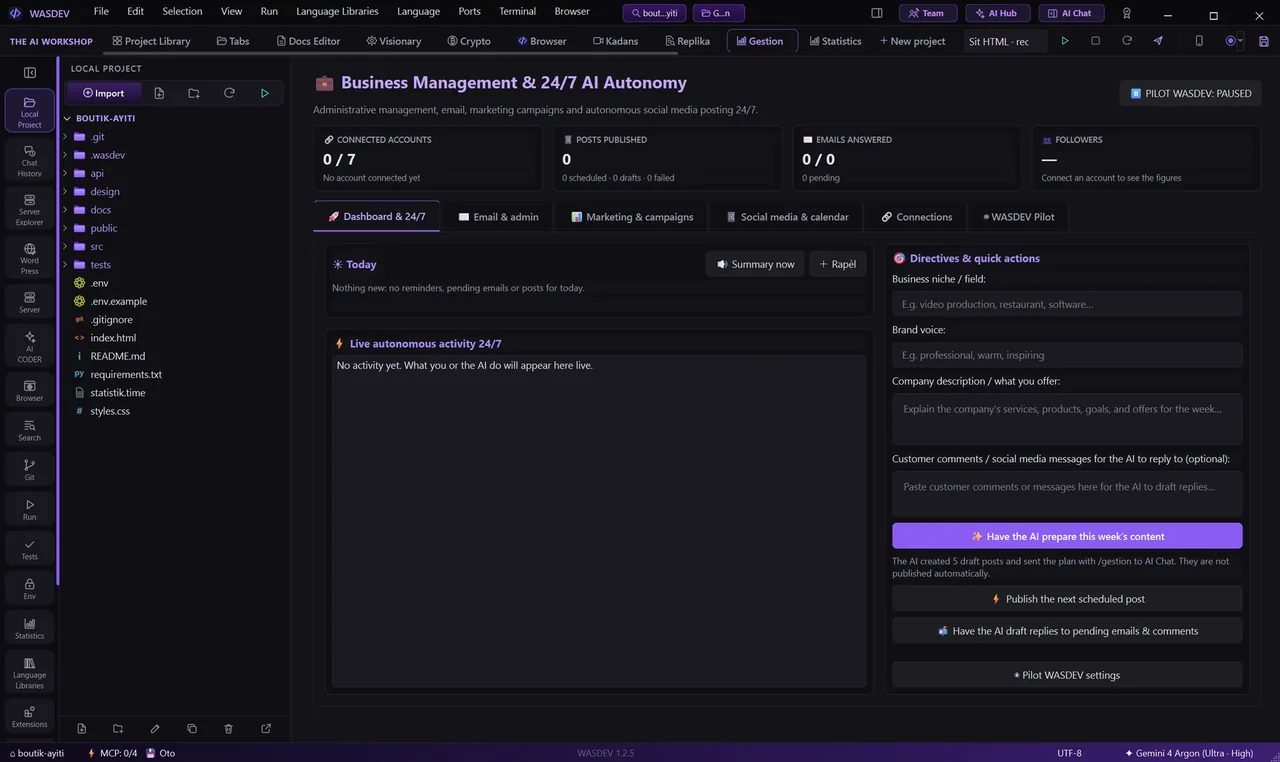
- In the top bar, open Gestion.
- The module keeps your reminders, clients and messages for the active project — one business per project.
Reminders and the daily summary
- Create a reminder with a date; repeating reminders roll to their next date when you mark them done.
- The daily summary tells you what is due today, what is late, and whether there are emails or posts waiting.
- When there is nothing new, it says so plainly.
Clients and messages
- Keep your clients and their details in the module.
- Paste a client comment or a social-media message in the box.
- The AI prepares a reply; you review and approve it before anything is sent.
The Pilot
- The Pilot detects activity in your browser, your inbox and your posts, brings it into the chat, and lets the AI draft a response.
- It can run in the background. You are the only one who turns it on.
- Nothing is sent without your approval.
REZO SOSYAL and Social Media Suite
- Track your audience and growth across 11 social platforms: Facebook, WhatsApp, Telegram, Discord, Bluesky, Instagram, Threads, X, LinkedIn, TikTok, and YouTube, plus business E-mails (Gmail, Yahoo, Outlook, IMAP).
- TikTok Zero-Key: sign in directly in the WASDEV Browser; Pilot automatically extracts your
@usernameand monitors your profile without requiring API keys or third-party partner verification. - AI Content Multiplier: generate tailored posts and 9:16 viral TikTok/Reels captions with trending hashtags from a single idea.
- Unified Comments Inbox: read incoming comments from all networks in one place and let the AI draft on-brand replies.
- Send Guard: nothing is published or sent automatically; every post, email, or message requires your explicit 1-click confirmation (Level 2 DEYÒ).
Hey Pilot Voice and Zero-Token Actions
- Press
Ctrl+Alt+Spaceor click the microphone to talk to HEY PILOT. - 100% Local & Free (Zero-Token): speech-to-text uses embedded Faster-Whisper, and text-to-speech uses your system voice without consuming AI cloud tokens.
- Control the IDE by voice:
- *“Hey Pilot, run project”* / *“Hey Pilot, stop project”*
- *“Hey Pilot, start recording”* / *“Hey Pilot, stop recording”*
- *“Hey Pilot, check security”* / *“Hey Pilot, run tests”* / *“Hey Pilot, review code”*
- *“Hey Pilot, silence”* to stop speaking immediately.
- Switch between any of the 14 modules instantly.