


Chapter 23
Kripto
Follow the crypto market with verified data and offline snapshots, read a scenario analysis — bullish, range or bearish with probabilities — and get risk and security alerts. Analyse any coin with the AI from the chat.
Open Kripto
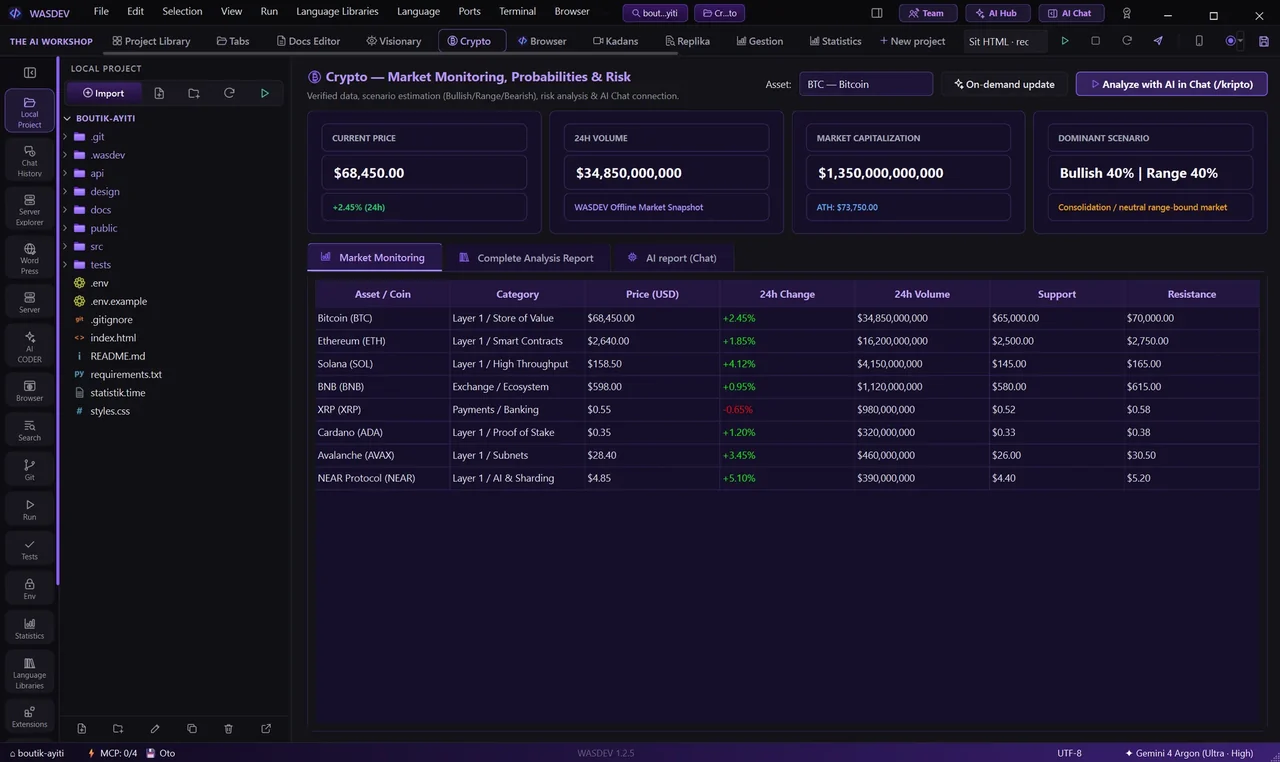
- In the top bar, open Kripto.
- The module shows the market for a list of assets with their category (Layer 1, smart contracts, exchange, payments, and others).
Market data
- Kripto fetches verified market data: price, change and volume.
- It keeps an offline market snapshot, so you still see the last known state without a connection.
Scenario analysis
- For a coin, Kripto shows three scenarios — Bullish, Range and Bearish — each with a computed probability.
- A risk and security section flags what to watch before you act.
Analyse with the AI
- Click Analyse with the AI in the chat (/kripto), or type
/kriptoin the chat with the coin you want. - The AI reads the current data and gives you a plain-language read of the situation.
- Kripto is for information only; it is not financial advice.