


Chapter 21
Replik — analyse
Drop a video, image, website or program and the AI analyses it for you: a full report, a summary, the text, SRT subtitles, the scenes, the style, the code details, JSON or a translation — in eight languages. Reverse-engineer a JavaScript application with /rea.
Open Replik
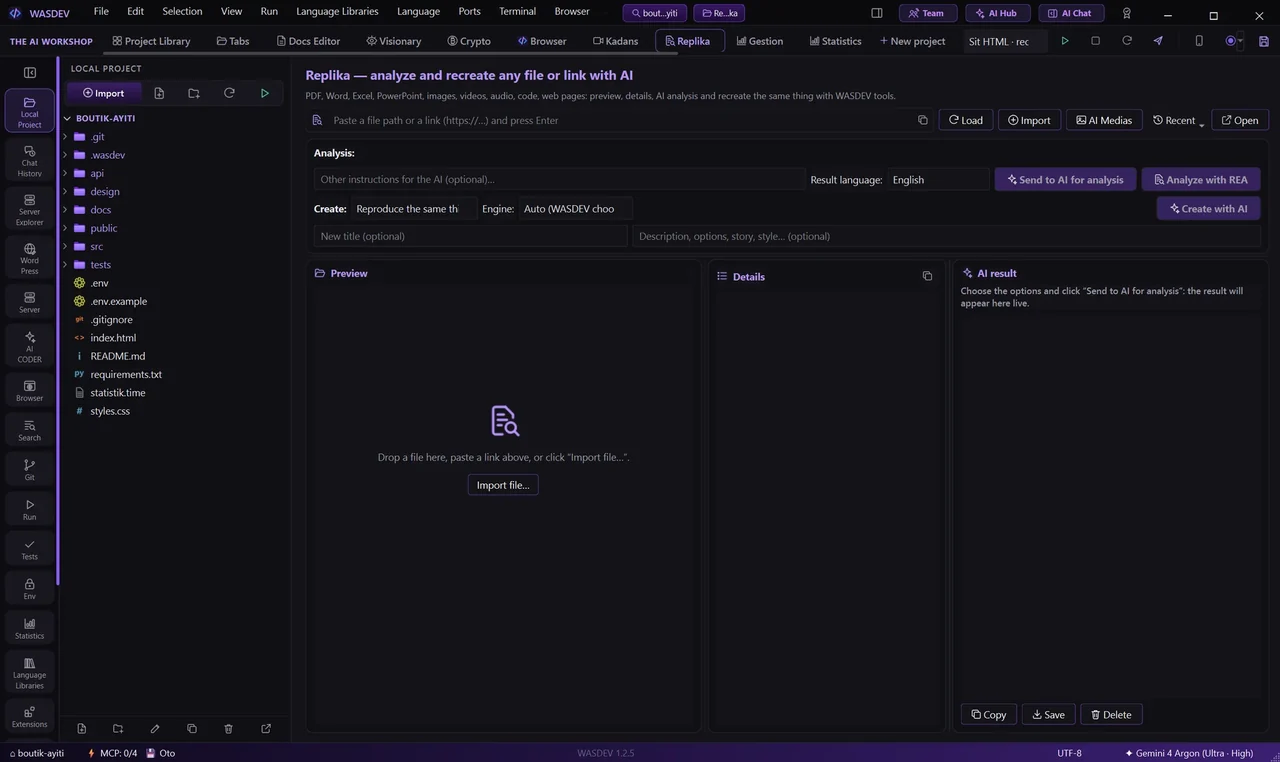
- In the top bar, open Replik (the button next to Kadans Studio).
- Give it something to analyse in any of these ways:
- drag and drop a file, a folder or a link onto the page;
- right-click a media in AI Medias or a file in the local project and choose Add to Replik;
- paste a URL.
- Replik accepts video, audio, images, documents, code and whole websites.
Choose what the AI should do
Pick an option, then click Send to AI for analysis:
- Full analysis, Summary, All text, SRT subtitles, Prompt, Code details, HTML, JSON, Style, Scenes, Data, Translate.
- Add your own extra instruction and the result language (eight languages).
- The analysis is added to the chat, where you can keep asking follow-up questions.
Analyse a folder
- Drop a folder on the page, or use Import → Folder.
- Replik reads the folder's structure and files and sends them for analysis as one unit.
/rea — reverse-engineer a JavaScript app
- In the chat, type
/reafollowed by what you need and, optionally, a path, folder or URL. - The request is routed to REA, which inspects the JavaScript application — its files, network requests, timers and views — and reports what it finds.
- Example:
/rea explain how this editor saves to disk C:\path\to\app